CSS3选择器 :checked选择器

03/10
在表单元素中,单选按钮和复选按钮都具有选中和未选中状态。(大家都知道,要覆写这两个按钮默认样式比较困难)。在CSS3中,我们可以通过状态选择器“:checked”配合其他标签实现自定义样式。而“:checked”表示的是选中状态
例如:实现自定义单选按钮的效果。
<!DOCTYPE html>
<html>
<head>
<meta charset="utf-8">
<title>属性选择器</title>
<link href="style.css" rel="stylesheet" type="text/css">
<style>
    form {
      border: 1px solid #ccc;
      padding: 20px;
      width: 300px;
      margin: 30px auto;
    }
    .wrapper {
      margin-bottom: 10px;
    }
    .box {
      display: inline-block;
      width: 30px;
      height: 30px;
      margin-right: 10px;
      position: relative;
      background: orange;
      vertical-align: middle;
      border-radius: 100%;
    }
    .box input {
      opacity: 0;
      position: absolute;
      top:0;
      left:0;
      width: 100%;
      height:100%;
      z-index:100;
    }

    .box span {
      display: block;
      width: 10px;
      height: 10px;
      border-radius: 100%;
      position: absolute;
      background: #fff;
      top: 50%;
      left:50%;
      margin: -5px 0  0 -5px;
      z-index:1;
    }

    input[type="radio"] + span {
      opacity: 0;

    }
    input[type="radio"]:checked + span {
      opacity: 1;
    }
</style>
</head>
<body>
<form action="#">
  <div class="wrapper">
    <div class="box">
      <input type="radio" checked="checked"  id="boy" name="1" /><span></span>
    </div>
    <label for="boy">男</label>
  </div>

  <div class="wrapper">
    <div class="box">
      <input type="radio"  id="girl" name="1"  /><span></span>
    </div>
    <label for="girl">女</label>
  </div>
</form>
</body>
</html>
效果如下图所示: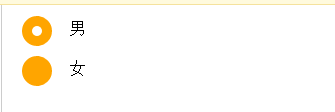
版权属于:
Dcr163的博客
本文链接:
https://www.dcr163.cn/134.html(转载时请注明本文出处及文章链接)